On a three-language site, the 404 page should be in the language of the URL. Anyone who lands on /ru/... gets Russian, /en/... gets English, and an address without a language prefix gets the site’s default language, which for us is Armenian. The server answers with a 404 code, not 200, and the page links to our main sections. That’s how we set it up, and you can check it in a minute.
What our 404 page looks like
Between two big fours stands the sad robot from our homepage, playing the zero. A speech bubble over its head carries its words. The heading reads: “Oops, looks like you’re lost.” Below it: “This page doesn’t exist. Let me show you the way.” Five buttons hang under the floor: “Home”, “Services”, “Prices”, “About”, and “Contacts”. Each floats at its own pace. Home is highlighted in color as the main exit. On phones, only four buttons remain, in a two-by-two grid, with “About” hidden.
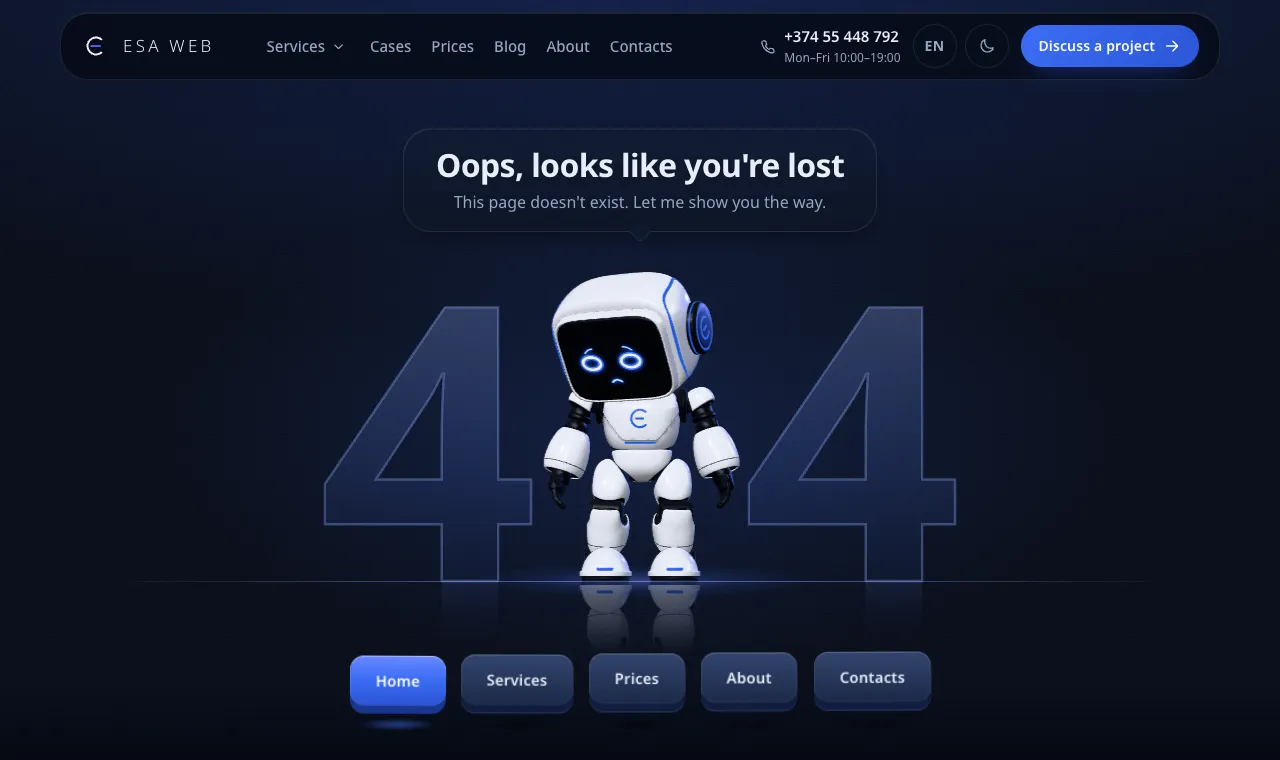
The live 3D robot follows the mouse cursor. If JavaScript is off or WebGL is missing, a still image takes over. The same happens when someone turns on reduced motion: the robot stays in the same pose, and the buttons don’t move. The fours and the floor are hidden from screen readers, leaving only the heading, the line in the bubble, and the links.

The page exists in three languages. In Armenian the robot says “Վա՜յ, կարծես մոլորվել եք”, and in English “Oops, looks like you’re lost”. Any URL that doesn’t exist shows it live, for example https://esaweb.am/ru/takoj-stranicy-net/.
Which language to show on a 404
| Option | How it works | What is wrong with it |
|---|
| By URL | Russian under /ru/, English under /en/, Armenian for the rest | Someone typing an address without a prefix gets Armenian, even if they read Russian |
| By browser language | The server reads the Accept-Language header | Bots and visitors see different content, and Google advises against changing page language based on browser settings |
| One language for everyone | A single page across all URLs | Russian speakers get Armenian |
Google is blunt about redirects: don’t send users automatically by language. Googlebot crawls mainly from the US and doesn’t send language headers, so it can easily miss your localized versions. That advice is about redirects, but the logic holds for 404 pages too. A response that depends on headers shows one thing to crawlers and another to users, while the URL is unambiguous. Google also recommends a separate URL for every language version.
We handle this on the server. Errors under /ru/ get /ru/404/, under /en/ get /en/404/, and everything else gets /404.html in Armenian. On November 4, 2026, I checked three URLs, and each returned a 404 in the right language: the markup sets lang="ru", lang="en", or lang="hy", and the page title is translated. The header keeps its language switcher.
Where to send visitors
Send them to the key sections, not to a sitemap. A lost visitor needs an immediate next step. We keep the buttons to a minimum: home, services, prices, about, and contacts.
Sending visitors straight to the homepage is a mistake. Google’s documentation on site moves says that redirecting deleted URLs to the homepage en masse confuses users and can produce soft 404s. If a deleted page has a direct replacement, set up a 301 to it. If there’s no replacement, let the URL return a 404 and show a page that points people to an exit.
How a real 404 differs from a soft 404
A soft 404 is a page that displays a “not found” message while returning a 200 status code. A person sees an error, but a crawler sees success.
| Real 404 | Soft 404 |
|---|
| Response code | 404 | 200 |
|---|
| What Google does | Ignores content on 4xx codes and treats 404 and 410 the same | Search Console reports a Soft 404 status |
|---|
| What to do | Nothing, if the page is gone for good | Return 404 for missing pages; add content if the page is real but empty |
|---|
Testing this takes a minute:
curl -sI https://esaweb.am/ru/takoj-stranicy-net/
HTTP/2 404
If the first line says 200, you have a soft 404. Search Console statuses are covered in our post on why a website isn’t on Google.
What the “Not found (404)” report shows in Search Console
It lists URLs that returned a 404 over the past month. Google’s explanation is simple: the page returned a 404, and Google found the URL on its own, for example through an external link, not from your sitemap. That isn’t necessarily a problem. If you deleted a page with no replacement, a 404 is the expected answer. Google recommends fixing only the 404s that you link to internally or still list in your sitemap. The crawler will keep revisiting that URL for a while.
For each URL in the report: if the link comes from your own site, fix it. If the URL has a replacement, set up a 301. If neither applies, leave it alone.
Do we track 404 visits?
The page_404 event reaches Google Analytics 4 only after a user consents to analytics cookies, so the numbers are undercounted. Visitors who decline cookies never show up.
What to check on your site
- Open a nonexistent URL in each language to see which language the page returns.
- Check the response code with
curl -sI: it should return 404.
- Make sure the page includes a language switcher and links to your main sections.
- Verify that the 404 page is absent from your sitemap and that its markup includes
noindex.
- Look at the Search Console report once a month and fix any broken links you made yourself.
We do this as part of our website maintenance, along with monitoring and URL checks. I earn a living from maintenance, but this check takes one evening, and you can do it yourself. If you want to know how we set up a site in three languages, read our post on three languages.
Sources
- Google Search Central: HTTP status codes and network errors: 4xx, 404 and 410, Soft 404. Verified on November 4, 2026.
- Google Search Console Help: Page indexing report: “Not found (404)” and “Soft 404”. Verified on November 4, 2026.
- Google Search Central: Managing multi-regional and multilingual sites: automatic redirects, separate URL per language. Verified on November 4, 2026.
- Google Search Central: Site moves with URL changes: redirects to the homepage. Verified on November 4, 2026.
- Our own check of esaweb.am, November 4, 2026: response codes and languages of three 404 pages,
noindex markup, page source.

 Search